All the hard work you do as an Awaz Live host or agent deserves a fast and easy withdraw. In this guide, we will walk you through the entire Awaz Live withdrawal process from start to finish. Keep reading to learn exactly how to cash out your money, fix common payment problems, and find simple answers to frequently asked questions so your transfer goes perfectly.
Awaz Live Withdrawal Rules You Must Meet
Before you can cash out, make sure your account follows these four important rules:
- Completed Face Verification
This is required for everyone. Hosts must do it before going live, and agents must do it before getting paid. If you have not done this yet, check out our full face verification guide to get it done fast.
- Verified Email or Phone Number
Your account must be securely linked to your contact info. Go to your Awaz Live profile and make sure your email address or phone number is successfully bound to the app.
- Minimum Withdrawal Amount
Your balance must reach the minimum limit of $10 USD before you can ask for a payout. If you do not have $10 yet, the withdrawal menu will stay hidden.
- Active Payment Account
Awaz Live pays you through direct bank transfers or supported e-wallets. Make sure your chosen receiving account is active and ready to accept money.
Awaz Live Withdraw Tutorial (Step-by-Step)
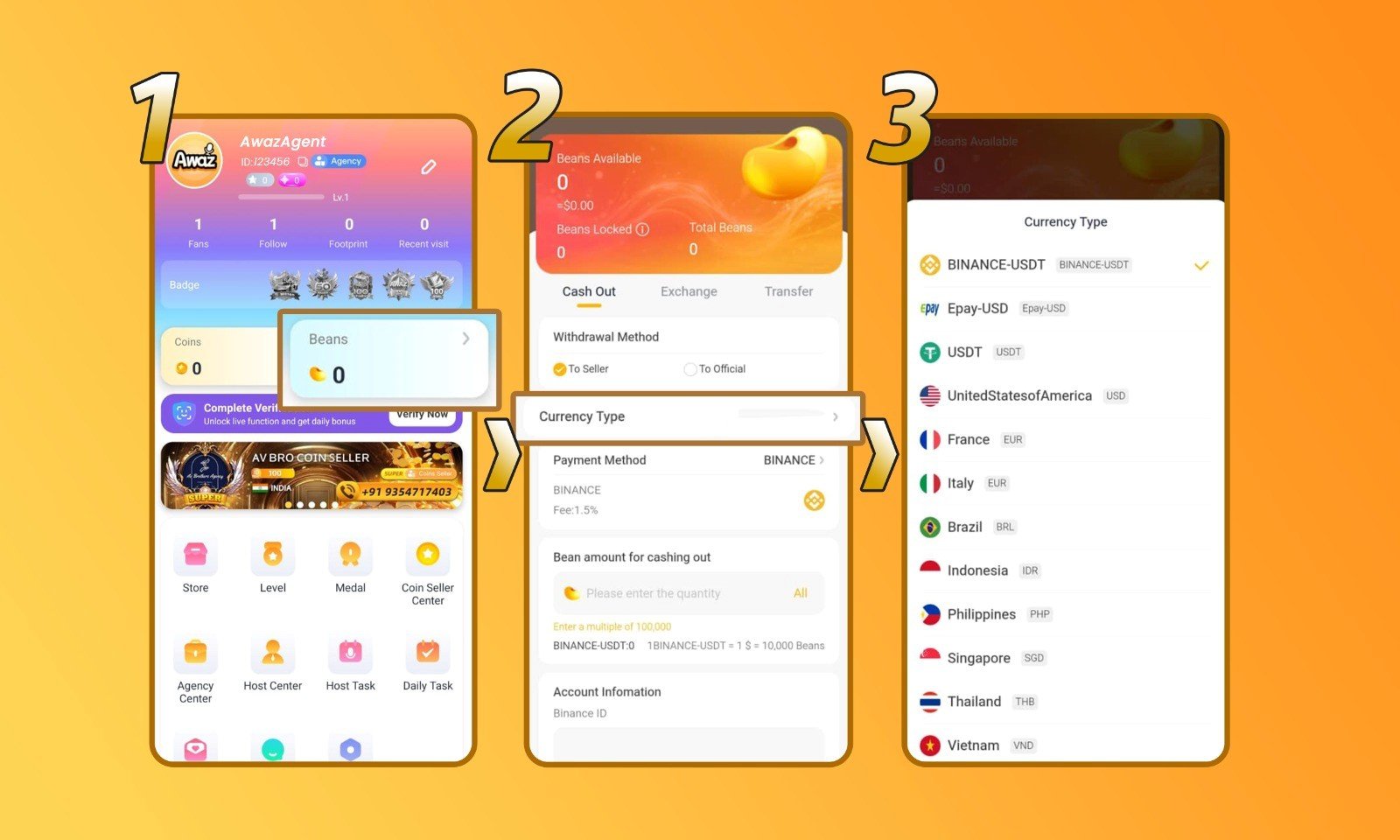
1. Go to your Awaz Live profile and click ‘Beans’
Open the Awaz Live app on your phone and tap your profile icon. Look for the Beans button and click it to open your main wallet and check your current balance.
2. On the ‘Cash Out’ menu, click ‘Currency Type’
Inside your wallet, look for the Cash Out section. Tap on the Currency Type option to pick the exact local currency you want to receive for your payout.
3. Connect your payment account by clicking ‘Payment Method’
Next, tap the Payment Method button to tell the app where to send your money. You can link a bank account or an e-wallet here. Make sure you type your account numbers very carefully!
4. Enter the amount you want to withdraw
Finally, type in the exact amount of money you want to cash out. Remember, you must meet the $10 minimum. Double-check your details and submit your request to finish the process!
Awaz Live Withdrawal FAQ
- What is the minimum withdrawal amount?
The lowest amount you can cash out is $10 USD. Remember that all withdrawals must be made in multiples of 10 (for example: $10, $20, $50, $100, or $200).
- What payment methods does Awaz Live support?
The app currently supports Epay, USDT crypto, PayPal, direct bank transfers, and local e-wallets. Because the options change depending on where you live, check the app to see the exact services supported in your area.
- Are there any transfer fees?
This depends totally on the payment method you pick. Some third-party companies (like your bank or PayPal) charge their own transfer fees, and these prices change from one service to another. Always check the fees with your chosen provider before you cash out.
- Can hosts withdraw their own earnings?
Yes! As a host, you have total control over your own wallet. You can make a withdrawal all by yourself whenever you are ready.
- What if I linked the wrong payment account? Do not panic! You can easily remove a payout account. You can unlink the wrong details and update your payment information at any time by contacting our team.
Fixing Common Withdrawal Problems
- My withdrawal failed to process.
Failed payouts usually happen because of a typo in your payment details, an inactive bank account, or using a method that the app no longer supports. If your transfer fails, try switching to a different withdrawal method and contact our support team for help.
- The withdrawal button is missing.
If you cannot see the menu, you are missing a requirement. Check the rules: make sure your face verification is done, your email/phone is verified, and you have at least $10 USD in your balance.
- A specific payment method isn’t showing up.
Payment options depend heavily on your region. If a certain service is not on your screen, it simply is not supported in your area right now. Please choose from the payout methods that currently show up for your location.
- My withdrawal is taking longer than expected.
Normally, standard withdrawals are completely finished within one to three business days. If your money has been pending for longer than that, please reach out to our support team so we can look into the delay for you.
Your Earnings Are Just a Few Taps Away
Once your account follows the rules, the Awaz Live withdraw process is incredibly simple. Whether you are cashing out as a host or an agent, the most important step is just making sure your payment details are 100% correct before you hit submit.
Do you still have questions about getting paid or anything else on the app? Our helpful support team is always ready to assist you. Do not hesitate to reach out to us directly, or visit our blog for more easy tips and app tutorials!